Pattern recognition
This is what separates Memora from a notes app. Each log entry feeds into a per-item placement model. After enough data points, the most likely current location is surfaced automatically, with no search required.
A local-first Android app that learns your routines and remembers where you put your keys, wallet, passport, etc. All data is stored exclusively on your device. No accounts, no cloud, no tracking.
Ten minutes lost each day to searching for misplaced items amounts to 0 hours annually.
Memora eliminates that loss entirely.
Inside the app
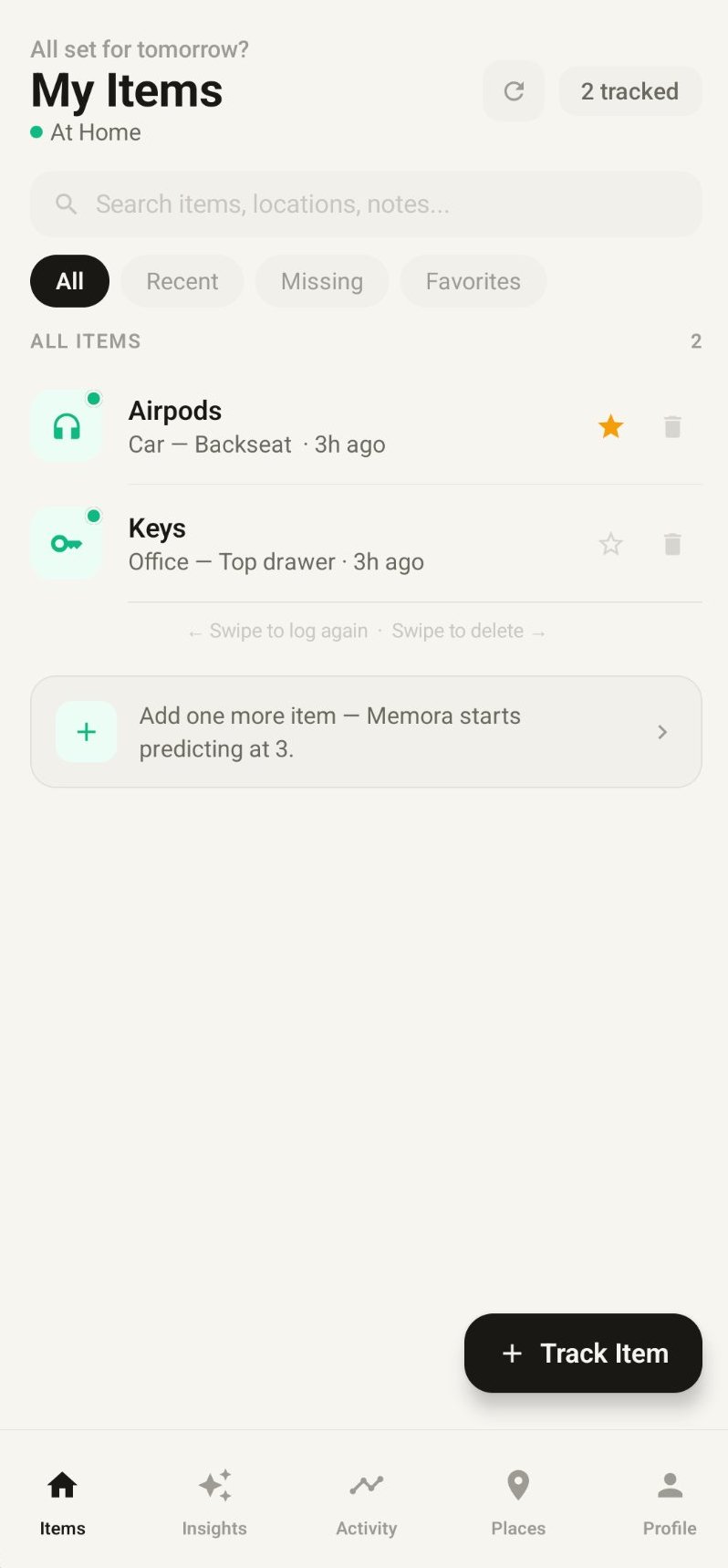
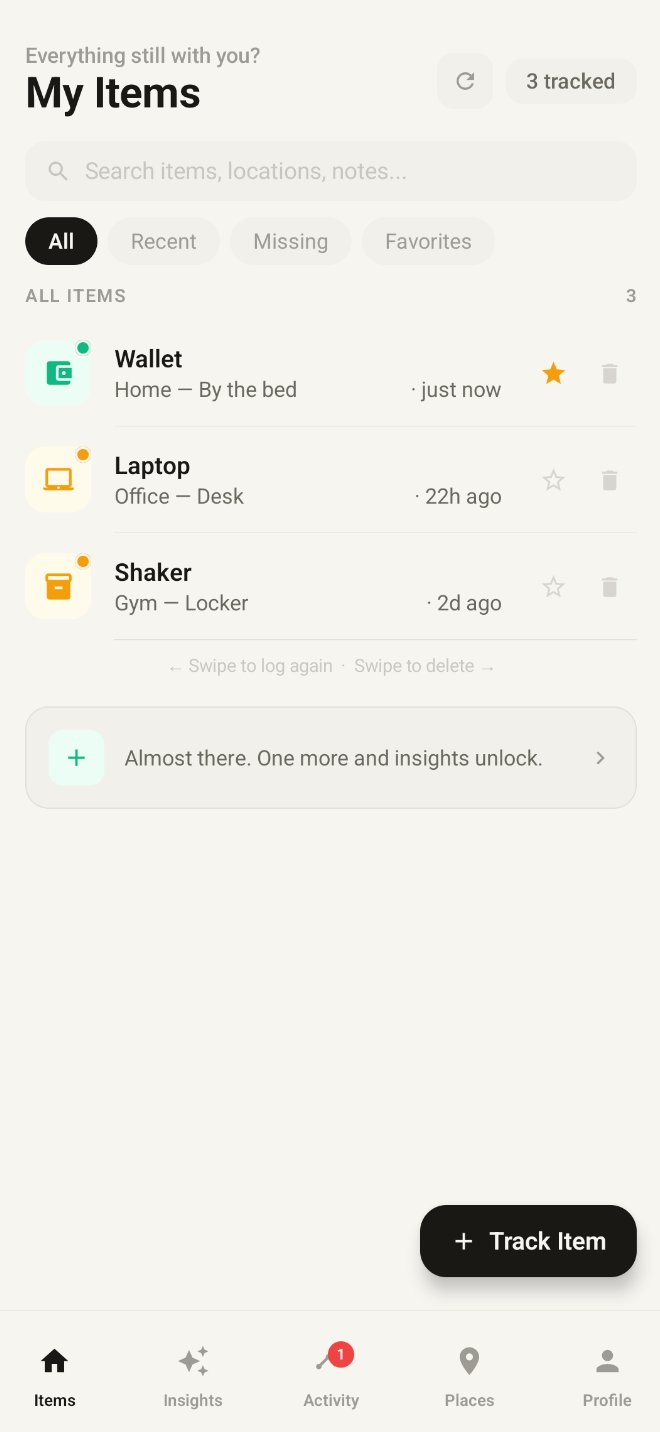
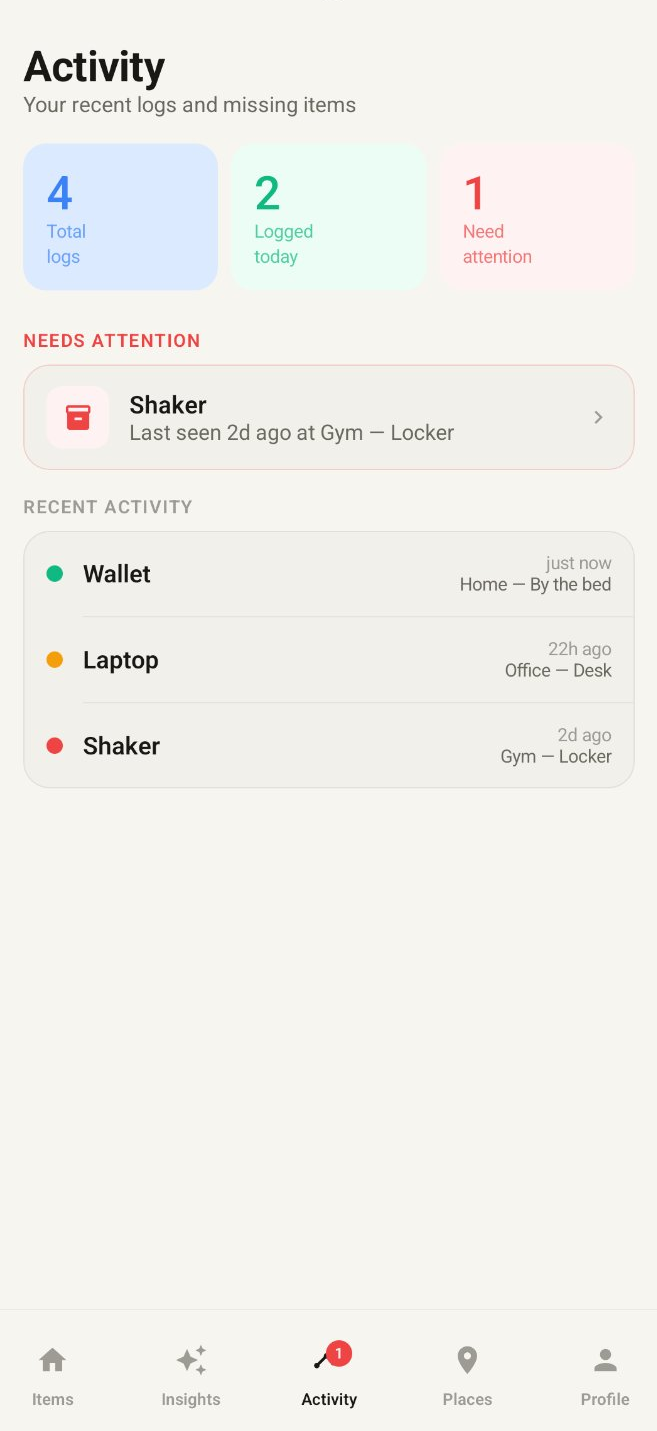
Memora observes where each item is recorded over time and identifies its typical location. As patterns emerge, lookups become faster and missing items are surfaced automatically.
Demo
Ask Memora
Sample data. In the app, results reflect your actual logged history.
How it works
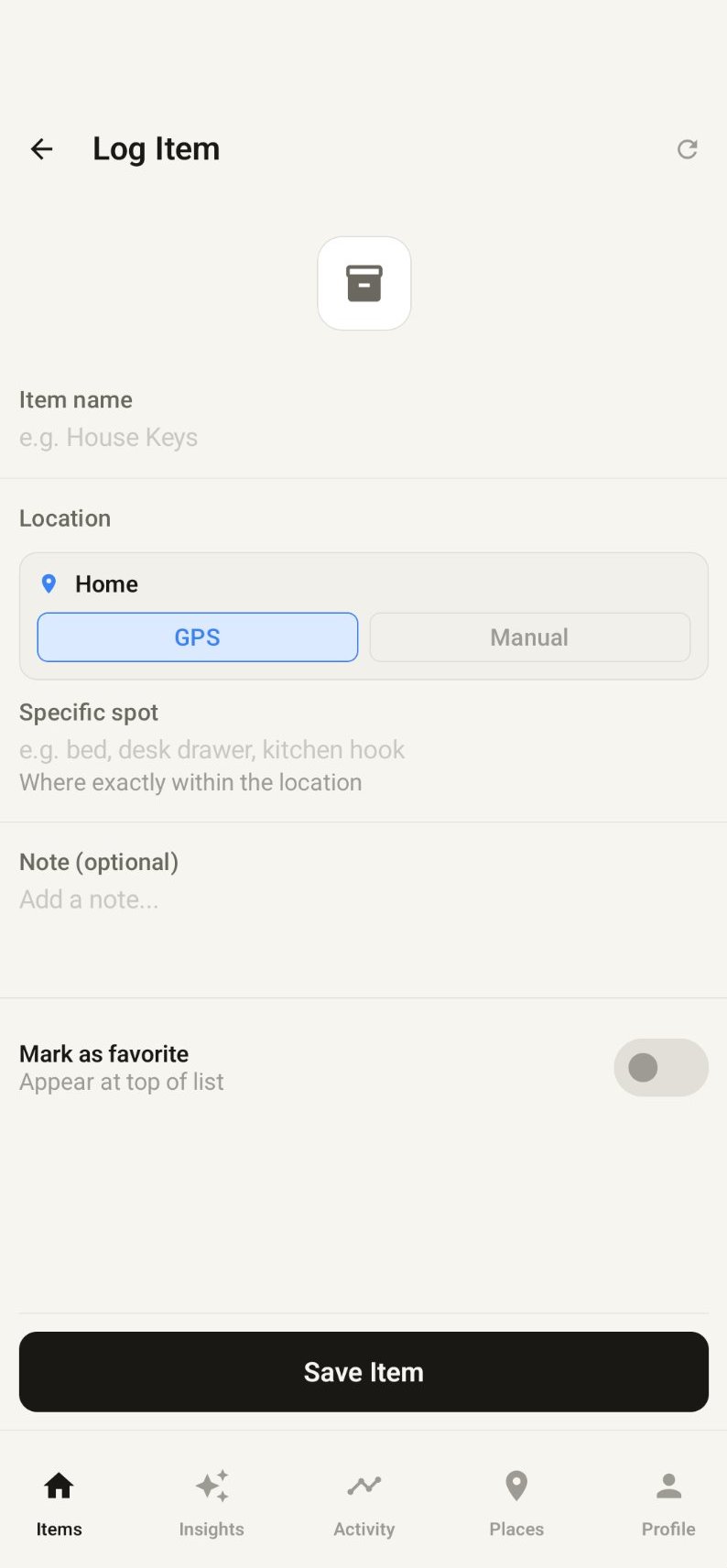
Tap Track Item, enter a name such as "Keys" or "Wallet", and Memora records your current GPS position. The entire process takes under five seconds.
Each log entry captures a precise GPS coordinate via the Fused Location Provider. Bluetooth devices are logged automatically upon disconnect, with no manual action required.
After a few days of logging, Memora identifies where each item typically ends up. The home screen surfaces likely locations automatically, so finding something usually doesn't require a search at all.
No subscription required. Once configured, Memora operates indefinitely with no further setup or ongoing maintenance.
How it compares
| Feature | Memora | Tracker tags | Notes app |
|---|---|---|---|
| Works for anything you own | Needs device | ||
| Nothing to buy or attach | Free | $25+ | |
| Logs location automatically | |||
| No cloud · no tracking | Depends | ||
| Learns your patterns | |||
| Works offline |
Capabilities
The core feature isn't tracking. It's prediction. After a few weeks of logging, Memora knows where each of your items typically ends up, and surfaces that information before you have to search.
This is what separates Memora from a notes app. Each log entry feeds into a per-item placement model. After enough data points, the most likely current location is surfaced automatically, with no search required.
Location is captured at the moment of logging via the device's Fused Location Provider. Named places can be saved as persistent geofences and used for single-tap logging on return visits.
Memora monitors Bluetooth disconnect events for paired devices. When a device disconnects, the last known location is logged automatically with no manual input required.
Define geofences around frequently visited locations. Memora issues a notification when you exit the boundary without having logged a specified item.
A 2x2 home-screen widget displays your three most frequently tracked items. A single tap logs the current GPS position without requiring the full app to open.
The database, search index, and location logic all run on-device. Memora is fully functional without any network connectivity, in any environment.
All records are encrypted using AES-256 via SQLCipher. The encryption key is generated on-device and never transmitted. No data leaves the device under any circumstances.
All data is stored exclusively on your device.
No external servers, no user accounts, no analytics, and no advertising. All data is encrypted with AES-256 and stored locally. Uninstalling the app permanently removes every record.
Support
For questions not addressed here, submit feedback through the Google Play listing.
Memora uses the device's Fused Location Provider, accurate to within a few meters outdoors. Indoors, the app falls back to the last known GPS fix combined with your defined Places. The result identifies the general location rather than a specific room, which is sufficient for the majority of retrieval scenarios.
No. Memora only reads location when you log an item or cross a geofence. There is no continuous background tracking. Battery impact is typically under 1% per day. All permissions are optional; background features can be disabled individually.
Android 8.0 (Oreo, API level 26) or later. Memora runs on roughly 95% of active Android devices. On Android 12 and above, some features like approximate-only location work even if you deny precise location.
Yes. Settings > Export produces a standard SQLite database file that can be saved to Drive, a local folder, or any other destination. The export is encrypted with the key stored on your device, so restoration requires the same device. An unencrypted JSON export is also available for portability.
Three methods are available: Settings > Erase all data wipes the database in-app; the Android app info page provides a Clear storage option; or uninstalling the app removes all data. Because no data is stored on external servers, each method results in permanent, irreversible deletion.
Nothing. Memora's SQLite database lives in the app's private storage, which Android preserves across OS updates. Your data, encryption key, and preferences all survive. The only thing that would clear them is a factory reset or uninstalling the app.
Not currently. Memora's local-first architecture does not include server-side sync infrastructure, which is a prerequisite for cross-device shared lists. This feature is on the roadmap under a privacy-preserving design. Feedback through the Play Store listing is welcomed.
Because all data resides on the device, losing the phone results in the loss of Memora history unless a backup has been exported. This is an inherent consequence of the local-first privacy model. Periodic exports via Settings > Export are the recommended safeguard.
Location (to record your position when logging an item), Bluetooth (for automatic logging on device disconnect), and Notifications (for geofence-based reminders). All processing occurs on-device. No data is transmitted to external services.
Not currently. Memora is Android-only at this time. Any future iOS availability will be announced through the Google Play listing and developer contact channels.
Available now
Free to download. No account required. Available on Android 8.0 and above.
Under 10 seconds to install No account required Requires Android 8.0 or above
Memora is architectured around local-first principles. This document describes the data practices in detail.
Section 01
Memora ("we", "our", or "the App") is committed to protecting your privacy. This Privacy Policy explains our practices regarding the collection, use, and disclosure of information through our mobile application.
Memora is designed as a Local-First application, meaning privacy is not just a feature, but the foundation of the app's architecture.
Section 02
The Memora Android application does not collect, store, or transmit any personal data to external servers. All information you enter into the App remains exclusively on your physical device. Specifically:
We do not have access to this data, and we cannot recover it if you lose your device or uninstall the App. This applies to all information processed within the application itself. Limited data collected through the website (specifically, an email address submitted to receive the closed-test invite link) is described separately in Section 03.
Section 03
The Memora website includes a signup form used to distribute the closed-test invite link for the Google Play testing track. When you submit this form, the following information is collected:
A. How the email is used
Your email is used exclusively to deliver the invite link by automated message. It is not shared with third parties, used for marketing, added to a newsletter, sold, or used for any purpose other than tester invitation and any directly related follow-up communications about the closed test.
B. Where it is stored and how it is sent
Submissions are stored in a private Google Sheet accessible only to the developer. The automated invite email is sent through Resend, a transactional email service, from a Memora-branded address on our own domain. No personal email account is involved in the sending process. Resend acts as a data processor under our instructions; their handling of your address is governed by Resend's own privacy policy.
C. Retention and deletion
Email addresses are retained only for the duration of the closed test plus a reasonable period afterward to support transition to public release. To request earlier deletion of your email address from the tester list, contact us through the Google Play Store developer contact information.
Section 04
To provide its core features, Memora requires certain permissions. Here is how they are used:
A. Location Data
Memora uses the Fused Location Provider and Geofencing API to detect when you arrive at or leave a saved location.
B. Bluetooth
The App requests Bluetooth permissions to detect when you disconnect from specific devices (for example, a car stereo). This trigger is used to remind you to log your items. We do not collect your Bluetooth device IDs or connection history.
C. Notifications
We use local notifications to send you reminders. These are generated entirely on your device and do not involve any remote push servers.
Section 05
The Memora Android application does not use third-party analytics (such as Google Analytics or Firebase), advertising networks, or crash reporting tools that transmit data off-device.
The website's tester signup form (described in Section 03) relies on Google Apps Script to receive submissions and Resend to deliver invite emails. Submissions are stored in a private Google Sheet. Google's and Resend's processing of this data is governed by their respective privacy policies.
The App is distributed via the Google Play Store, and Google may collect certain standardized metadata as described in their own privacy policies. This is outside our control and unrelated to activity within the App.
Section 06
Memora is safe for users of all ages. Because we do not collect any personal information from any user, we are fully compliant with the Children's Online Privacy Protection Act (COPPA). No data from children or any other users is ever transmitted to us or any third party.
Section 07
Under the General Data Protection Regulation (GDPR) and the California Consumer Privacy Act (CCPA), you are the "Data Controller" of your information.
Section 08
Since your data is stored on your device, its security depends on your device's security. We recommend using a screen lock (PIN, fingerprint, or face recognition) to protect the information stored within Memora.
Section 09
We may update our Privacy Policy from time to time. We will notify you of any changes by posting the new Privacy Policy within the App. You are advised to review this Privacy Policy periodically for any changes.
Section 10
If you have any questions or suggestions about our Privacy Policy, do not hesitate to contact us through the Google Play Store developer contact information.
Free to download. No account required. All data remains on your device.
Download on Google Play